
AI-assisted work depends on three things. What the model can do. What the tool exposes for an agent to drive. What the user knows about each.
A Firebase Hosting and Firestore setup, done with Claude as the in-editor collaborator, took minutes of technical work. It was efficient because two different things lined up: Firebase had built a complete command-line interface alongside its web console, giving an AI agent a surface it could actually drive, and I knew the Firebase domain and using AI agents well enough to direct the agent through it.
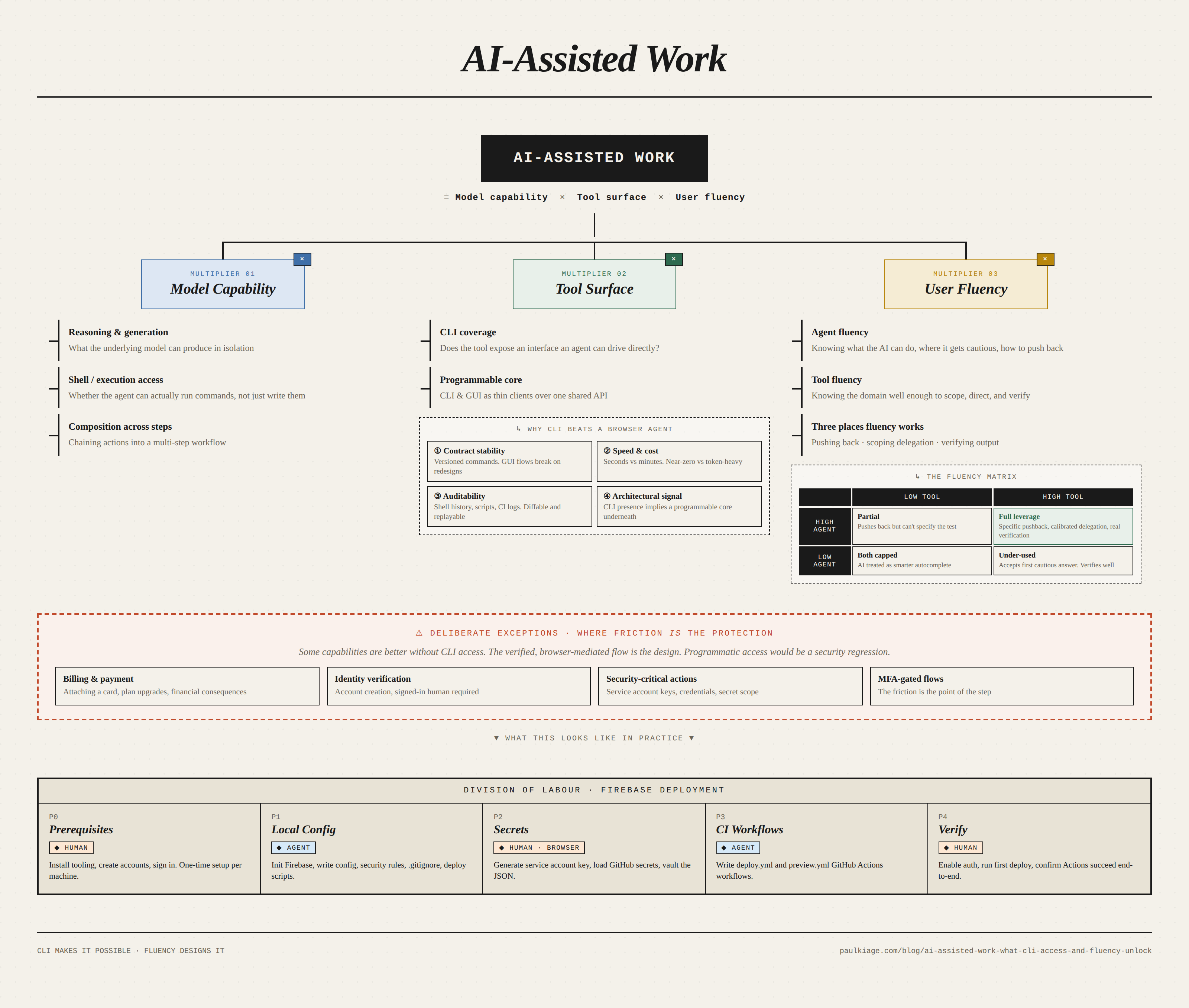
Agent, tool, and user: the three surfaces of AI-assisted work
The setup
The toolchain: VSCode as the editor, Claude as the collaborator inside VSCode, GitHub for version control. The goal: a complete Firebase deployment pipeline with hosting, Firestore rules, automated deployment via GitHub Actions, preview URLs on pull requests, and a security model that did not depend on remembering to delete credentials manually.
Claude handled the bulk of the technical setup: configuration files, GitHub Actions workflows, gitignore patterns, Firestore security rules, and the CLI commands to initialise and deploy the project.
CLI exposure enhances AI collaboration
Firebase has firebase-tools, a complete command-line interface that exposes nearly every capability available through the web console: project initialisation, deployment, security rule updates, emulator runs, authentication management, function deployment. That CLI is why Claude could meaningfully help with the setup. It is the surface AI agents can drive.
Without it, the work would have run much slower. Claude could still generate configuration text, but it could not perform the setup at comparable speed and reliability. Every action would have required either manual clicks through the browser or a browser-driving agent working through the UI one screenshot at a time.
So AI capability is downstream of a prior question about the tool: does the tool expose its functionality through an interface an agent can drive efficiently? Tools with CLIs are AI-collaborative in a structural sense. Tools with only web consoles force AI collaboration through a slower, less reliable, more expensive path.
Firebase made this choice. So did GitHub with gh, Stripe with stripe, and most developer tools built with developer experience in view. The correlation is not accidental. Code-accessible interfaces are what make a tool composable, automatable, and AI-collaborative.
The browser-agent counterargument
Browser-using agents now exist: Anthropic’s Claude computer use, OpenAI’s Operator, Google’s Project Mariner, and improving open-source equivalents. One view is that APIs and CLIs matter less over time, because a sufficiently capable agent can operate any software with a user interface. If so, the CLI question is transitional.
The argument is partly right. Browser-using agents do close some of the gap, particularly for one-off tasks against tools with no CLI. “Locked out entirely” overstates the problem.
But the gap is larger than it first appears, for four reasons that do not go away as the models improve.
First, contract stability. A CLI command is a stable contract, a button is not. Web interfaces change, elements shift, flows get redesigned, and each change can break a browser agent that learned the old layout. CLI commands are versioned and deprecated on an explicit schedule, GUI flows are not. Per-step failure rates compound across multi-step workflows.
Second, speed and cost. firebase deploy takes seconds and costs effectively nothing. Driving the Firebase Console through a browser agent takes minutes and uses tokens on every screenshot and reasoning step. For one-off work this is tolerable. For work done across projects, or in CI, the difference is structural.
Third, auditability. A CLI command in shell history, a script, or a CI log is inspectable, diffable, and reproducible. A browser agent’s click sequence is harder to review, version, or rerun deterministically. When a production incident requires reconstructing what happened, text-based command logs are a much more useful artefact than replayed mouse movements.
Fourth, architectural signal. In well-designed systems, the CLI and GUI are both thin clients over the same underlying API. The presence of a CLI signals that the tool is built on a programmable core; the absence often signals that it is not.
| Dimension | CLI-driven AI | Browser-using AI agent | Human in browser |
|---|---|---|---|
| Reliability | High (stable contract) | Medium (breaks on UI changes) | High (human adapts) |
| Speed | Seconds | Minutes | Minutes |
| Cost per run | Near zero | Significant tokens | Human time |
| Auditability | Shell history, scripts, CI logs | Hard to reproduce | None by default |
| Auth friction | Low (tokens, keys) | Hits 2FA, CAPTCHA, session walls | Designed for it |
| Composability | Pipes into scripts, CI, Makefiles | Limited | None |
| Right for | Repeated setup, deploys, automation | Occasional GUI-only tasks | Billing, identity, security-critical actions |
Each column has a zone where it is the right answer. So the refined claim: CLI exposure is not a binary of access versus no-access. It is a large difference in leverage. Browser-using agents narrow the gap for occasional tasks; they do not close it for the repeated, auditable, composable workflows that most developer tooling exists for.
Implications for tool builders and selection
CLI coverage is now one of the primary factors in how useful a developer tool is in AI-assisted work. For setup, configuration, and deployment work, the efficient path is now through an interface the agent can drive directly. The alternative is paying reliability, speed, and auditability costs on every step. Tool builders without CLI coverage are choosing, implicitly, for the tool to be less useful in AI-assisted workflows. And for developers choosing between two tools with comparable core functionality, CLI completeness is now a variable worth weighing alongside functionality, pricing, reliability, and ecosystem.
Deliberate exceptions
Some capabilities are better off without CLI access. These are cases where the verified, browser-mediated flow is the protection, and programmatic access would be a security regression.
Billing and payment are the clearest examples. Attaching a credit card to a billing account should not be performed by an AI agent, CLI-driven or browser-driving. The verification model differs from ordinary tool operations, and a mistake has financial consequences. Firebase reflects this correctly: billing cannot be configured through firebase-tools. It requires the browser, a signed-in Google account, and the verification flows that come with both.
The same logic applies to identity verification, security-critical actions such as generating service account keys, and any flow gated by multi-factor authentication. The friction of the browser-mediated flow is the protection. Programmatic access in these cases would remove the friction that was the point.
For each capability, a tool builder should ask whether the action benefits from being scriptable and AI-driveable, or whether it benefits from requiring a verified human in a browser. The answer is different for “deploy a new version of code” than for “attach a credit card to a billing account.”
A complete CLI is not enough on its own
A complete CLI only sets the ceiling. Whether any of it gets used depends on the user. The relevant fluency is dual: fluency in what the AI agent can do, and fluency in what the tool being driven can do.
I asked Claude to run firebase-tools commands against the project directly. The response: Claude could write the configuration files and the deploy scripts, but it could not execute CLI commands against my Firebase project on my behalf. I should run them myself and paste back the output.
That response was not right for the environment. Claude in agentic mode inside VSCode has shell access, and I had run firebase and gh commands with it on prior projects. So the pushback named that directly and proposed a concrete test: try firebase login as a first step. It tried. It worked. The rest of the setup continued with Claude executing commands directly.
Accepting the first response would have routed every subsequent step through a human-mediated round trip: Claude generating commands, me copy-pasting them into a terminal, pasting output back, Claude generating the next command. A few minutes of direct work would have been a much longer period of narration.
The exchange worked because it drew on two kinds of knowledge simultaneously. Knowledge of Claude’s capabilities without knowledge of firebase-tools would have enabled the pushback but not specified the test. Knowledge of firebase-tools without knowledge of Claude’s capabilities would have accepted the first answer without realising it was worth pushing back.
The fluency matrix
The two fluencies compose. Either alone caps what the collaboration can reach, even when the tool has full CLI coverage.
| Low tool fluency | High tool fluency | |
|---|---|---|
| High agent fluency | Pushes back when the agent hesitates, but cannot specify the test. Accepts plausible-but-wrong output because the tool-specific error is invisible. | Full leverage. Pushback is specific, delegation scope is calibrated, verification catches the subtle errors. |
| Low agent fluency | Both ceilings active. AI output is treated as a smarter autocomplete at best. | Accepts the first cautious agent response. Verifies well, but the agent runs well below its actual capability. |
The matrix applies in three places where fluency does the work: pushing back, scoping what to delegate, and verifying output.
Pushing back requires both kinds at once
AI agents are generally precise about what they can and cannot do, but near the edge of their capabilities they trend toward the cautious answer: sometimes tuning, sometimes genuine uncertainty about the current environment, sometimes context carried forward from earlier in a session. The agent says it cannot do the thing, and occasionally the thing is actually doable. Without fluency to recognise the pattern, the first answer becomes the answer.
Generic disagreement gets deflected. What moves the conversation is specificity: naming the exact environment, a specific prior use, and a concrete next test. In the Firebase exchange, those three items split across both kinds of fluency. Environment and prior use came from fluency in the agent. The concrete next test, firebase login, came from fluency in the tool.
Scoping what to delegate
Several decisions in the Firebase setup were ones Claude could have answered reasonably: HTTPS or SSH for git push authentication, repository secrets or environment secrets for GitHub Actions, broad project-wide service account permissions or a custom role with only what was needed. The agent would have produced defensible defaults, but the defaults were not necessarily correct given project-specific context, and the cost of the wrong default compounds later.
Recognising these as decisions required tool fluency. Recognising that the AI will produce plausible-but-possibly-wrong answers for anything under-specified required agent fluency. The failure mode when either is missing: the user accepts the default, does not register it as a choice, and finds out months later.
Verification is predominantly tool fluency
Reviewing what the agent produced before it runs is tool-specific work. Firestore security rules can be read correctly only by someone who knows Firestore security rules. GitHub Actions workflows require the same familiarity with the format’s edge cases. Agent fluency adds something (knowing the model’s characteristic error classes, knowing how to phrase the correction), but the work is mostly knowing the tool well enough to read its output. This is the part of AI collaboration that resembles ordinary code review.
Division of labour during the setup
Once the capability question was resolved, the work split across three categories.
flowchart TD
    subgraph Legend[" Legend "]
        direction LR
        L1[Human]:::human ~~~ L2[AI agent]:::agent ~~~ L3{Shared decision}:::decision
    end

    Legend ~~~ Start
    Start([Start]):::endpoint --> P0
    P0[<b>Phase 0 · Prerequisites</b><br/>Human installs tooling<br/>and sets up accounts.]:::human
    P0 --> P1
    P1[<b>Phase 1 · Local config</b><br/>Agent initialises Firebase and<br/>writes config, rules, and .gitignore.]:::agent
    P1 --> D1{Security<br/>decisions}:::decision
    D1 -->|Human decides| P2
    P2["<b>Phase 2 · Secrets in browser</b><br/>Human generates the service account<br/>key and loads GitHub secrets."]:::human
    P2 --> P3
    P3[<b>Phase 3 · CI workflows</b><br/>Agent writes deploy and<br/>preview GitHub Actions workflows.]:::agent
    P3 --> P4
    P4[<b>Phase 4 · Verify</b><br/>Human enables auth, runs first<br/>deploy, confirms Actions succeed.]:::human
    P4 --> Done([Deployed]):::endpoint

    classDef human fill:#fde7d3,stroke:#c97a3f,color:#000
    classDef agent fill:#d6e9f8,stroke:#3f7ac9,color:#000
    classDef decision fill:#f5e1f5,stroke:#a34aa3,color:#000
    classDef endpoint fill:#ececec,stroke:#888,color:#000
    style Legend fill:#e8eaed,stroke:#6b7280,stroke-width:2px,color:#000
| Category | Who | Examples from the Firebase setup | Why |
|---|---|---|---|
| Text-based artefacts and CLI commands | Claude | firebase.json, package.json scripts, Firestore security rules, .gitignore, two GitHub Actions workflow files, firebase init and firebase deploy runs | Output is fast, iteration is cheap, artefacts are text the human can review |
| Browser-mediated, credential-bearing, security-sensitive actions | Human | Creating the Google account, billing setup, Blaze plan upgrade, service account key generation, GitHub secrets scope and entry, first-deploy approval | The browser-mediated flow is the design, not a limitation to work around |
| Decisions the agent could make but shouldn’t | Human decides, Claude executes | Secret scope (repository vs environment), service account role (broad vs custom), HTTPS vs SSH for git auth | The decision belongs to the person who bears the cost of it being wrong |
Closing
The useful questions about AI-assisted work are not about what the AI can do in isolation. They are about what the tool exposes to be driven, and what the user brings to drive it. As the underlying models improve, the composition of those two matters more, not less.
Practical: Setting up Firebase deployment with Claude
The practical structure that worked, plus a prompt template to adapt.
Tools
- Editor: VSCode (alternatives include Antigravity or Cursor)
- AI collaborator: Claude in VSCode. Alternatives: OpenAI Codex, Google Jules, and Gemini Code Assist with agent mode. For self-hosted or offline setups, open-source agents like Continue, Aider, Cline, and OpenCode can run against local models such as Gemma, Llama, or Qwen via Ollama.
- Version control: GitHub (used here for Actions) or GitLab (integrated CI/CD, often self-hosted). Both have full CLIs (
gh,glab).
A different shape worth naming: Replit with Replit Agent keeps the agent-plus-CLI pattern but moves the editor, shell, and runtime into a managed browser environment. The agent drives a CLI but the CLI and the machine are both remote rather than local.
Phases
Phase 0 is one-time prerequisites the user installs and signs up for. Phase 1 is local CLI work the AI agent handles. Phase 2 is browser work the user handles. Phase 3 is text generation the AI handles. Phase 4 is verification.
Phase 0: Prerequisites (one-time per machine)
- Install Node.js 20+ and the Firebase CLI
- Create a Google account, billing account, and Firebase project
- Install and configure Git
- Create a GitHub account, repository, and authentication method (HTTPS via
gh auth loginor SSH key)
Phase 1: Local Firebase configuration (AI agent handles most of this)
firebase loginandfirebase use --addto link the directory to the projectfirebase init hosting firestoreto initialise- Generate
firebase.jsonwith hosting and Firestore settings - Add deploy scripts to
package.json - Write Firestore security rules
- Add credential files to
.gitignorebefore generating any keys
Phase 2: Secrets and service account (browser-mediated)
- Generate a service account key from Firebase Console → Project Settings → Service Accounts
- Add
FIREBASE_SERVICE_ACCOUNTandFIREBASE_PROJECT_IDto GitHub repository secrets - Delete or vault the local JSON immediately after uploading
- Verify with
git statusthat the JSON is not tracked
Phase 3: GitHub Actions workflows (AI agent handles this)
.github/workflows/deploy.ymlfor auto-deploy on push to main.github/workflows/preview.ymlfor preview URLs on pull requests- Both reference the secrets created in Phase 2
Phase 4: First deploy and verification (manual)
- Enable authentication providers in Firebase Console
- Run
firebase deployfor the first manual deploy - Push to main and verify the GitHub Actions workflow runs successfully
Security checklist
Decisions worth making consciously rather than delegating:
- Repository secrets for solo projects, environment secrets for production with approval gates
- Custom service account with only Firebase Hosting Admin and Cloud Datastore User roles, rather than the default broad permissions
- Rotation procedure written before key generation, not after
- Service account JSON never pasted into chat, issues, or documentation
- On key leak, revoke via Google Cloud Console → IAM & Admin → Service Accounts → Keys
A service account key acts like a password: anyone holding it can deploy, read, or change data as if they were you. Write the rotation runbook before generating the first key. Planned in advance it takes ten minutes: revoke the old key in Google Cloud Console → IAM → Service Accounts → Keys, generate a new key, update the FIREBASE_SERVICE_ACCOUNT GitHub secret, and redeploy to confirm. Improvised while a key is actively leaking, it takes longer and tends to leave the old key live for hours it should not be. See Google Cloud — Managing service account keys and OWASP — Secrets Management Cheat Sheet.
Prompt template
Adaptable prompt for starting a Firebase deployment with an AI coding agent:
Set up Firebase deployment for this project using an AI agent with CLI access.

Tools: VSCode, AI coding agent (Claude in VSCode, Gemini Code Assist
in agent mode, Jules, or similar), GitHub.

1. Initialise Firebase with Hosting and Firestore using the Firebase CLI
2. Configure firebase.json:
   - public directory: [. | dist | build | public]
   - ignore dev/config files
3. Add deploy scripts to package.json (dev, deploy, deploy:hosting, deploy:rules)
4. Write Firestore security rules (user-scoped, auth required)
5. Add .gitignore entries for service account JSON files BEFORE
   generating any credentials
6. Create GitHub Actions workflows:
   - deploy.yml: auto-deploy to production on push to main
   - preview.yml: preview URL on PRs

Use project ID: [YOUR_PROJECT_ID]

After CLI setup is done, give me a clear list of the manual browser
steps I need to complete, in order, including:
- Service account key generation
- GitHub secrets configuration
- Auth provider setup
- First deploy verification

For each manual step, tell me what decision I am making and what the
trade-offs are, especially for security choices like secret scope and
service account permissions.
Asking the agent to flag security decisions explicitly converts the setup from a checklist into a conversation about trade-offs, which is where the relevant judgment lives.
Further reading
Firebase CLI:
- Firebase CLI reference
- Firebase CLI on GitHub
- Firebase Hosting documentation
- Firestore security rules
- GitHub Actions documentation
AI coding agents with CLI or in-editor access:
- Claude in VSCode: Anthropic’s in-editor agent
- OpenAI Codex: available via CLI and IDE integrations
- Gemini CLI: Google’s open-source terminal AI agent
- Gemini Code Assist: Google’s in-IDE agent, VSCode and IntelliJ, with agent mode
- Jules: Google’s asynchronous coding agent for GitHub repositories
The Firebase CLI covers authentication, Cloud Functions deployment, Realtime Database, local emulators, Remote Config, and most Firebase products. Most users work with a small subset, and reading the full command reference once surfaces capabilities that materially change how the tool is used.